
ZoneSafe V2P
Avonwood Developments · United Kingdom
An RFID zone around forklifts and plant that alerts the driver and vibrates the tag of the worker on foot.

ZoneSafe V2P is a vehicle-to-pedestrian proximity warning system that Avonwood Developments makes in the UK. An antenna on the vehicle sets up a 360° detection zone of up to 10 m; when a worker wearing an active RFID VibraTag enters it, the in-cab unit warns the driver by sound and light and the tag vibrates, even behind racking or walls. Each detection is logged for near-miss reports.
- Zone radius, maker's figure
- Up to 10 m
- Coverage around the vehicle
- 360°
- VibraTag rating
- IP67
- Tag standby per charge (maker)
- Up to 3 months
- Written from
- zonesafe.com · Web archive
- Information as of
- Local partner
- Not in public info
At a glance
Reduces
Collision risk between forklifts or heavy plant and people on foot, including people the driver cannot see
Suitable for
Sites where people on foot work beside forklifts, HGVs, telehandlers, excavators, load shovels or reach stackers and physical segregation isn't always possible, such as busy warehouses and loading bays. The maker lists warehousing and logistics, manufacturing, paper and packaging, timber, waste and recycling, quarries, ports, agriculture and marinas, and says the system is built for harsh outdoor sites such as construction and mining.
Not suitable for
Areas where people on foot are not issued a tag or cannot be relied on to wear a charged one, such as visitors passing through: V2P only detects people wearing a tag. For these cases the maker points to its tagless vehicle-to-infrastructure warnings (active signs, lights, floor projectors, barriers).
The maker's warnings (8)01 · How it works
From the driver's tag to the near-miss log
V2P has three core parts: an antenna on the vehicle (the maker calls it the pedestrian sensor), a control unit in the cab and a tag worn by every person on foot.
- 01
The driver's tag switches it on
Drivers carry their own tag. Placed in the holder in the cab, it activates the system so the vehicle starts monitoring its surroundings. Driver and pedestrian tags are colour-coded so they are not mixed up.
 02
02The antenna sets the zone
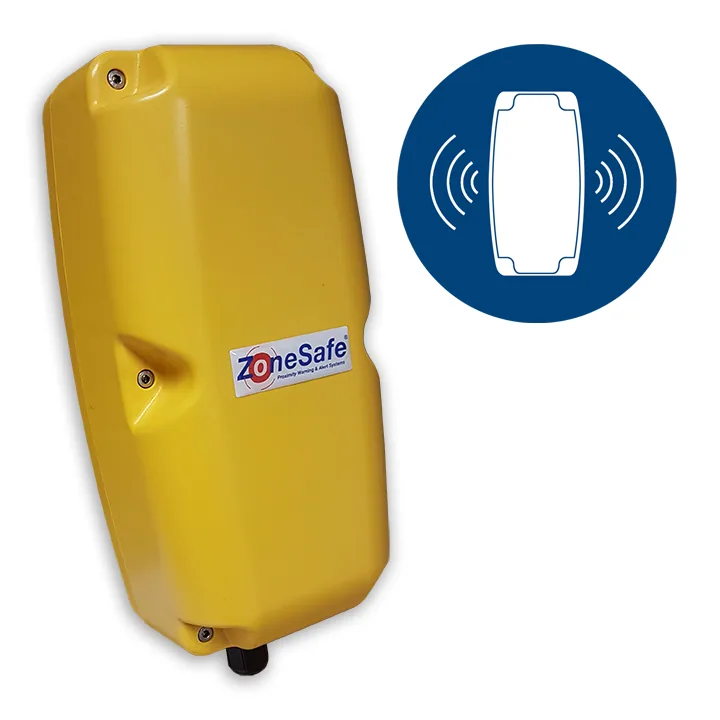
The antenna creates a 360° zone around the vehicle, set at installation and adjustable up to 10 m. More antennas can form one larger zone or separate zones; one recycling site fits front and rear antennas to its loading shovels.
 03
03A tagged worker enters, seen or not
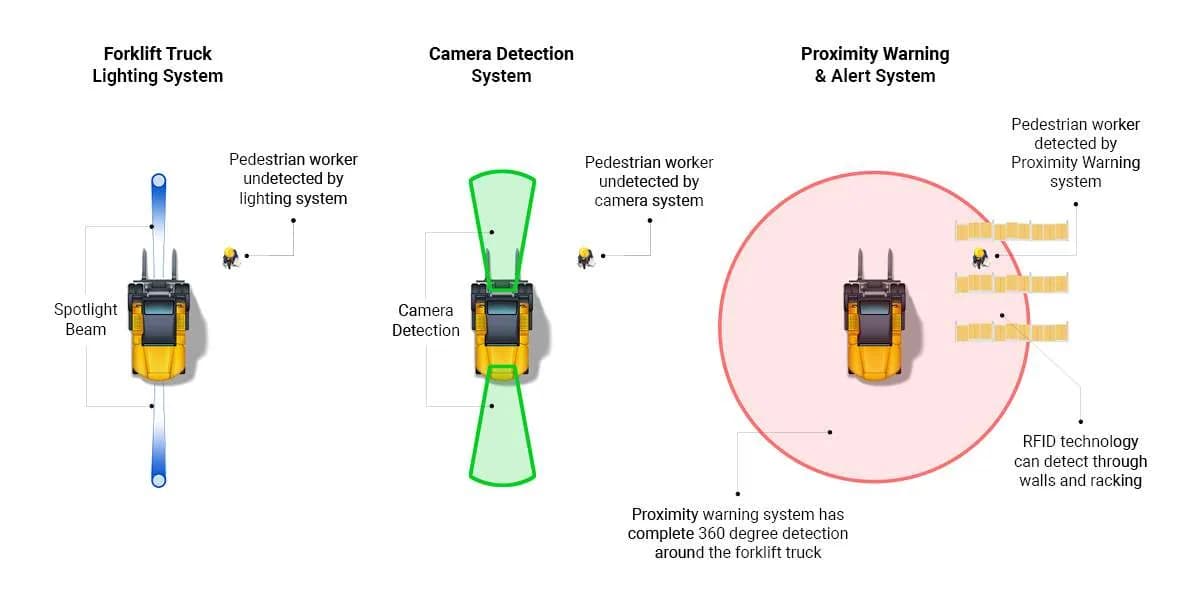
Each worker wears an active RFID VibraTag on an armband, lanyard, belt clip or hard hat, or in a pocket. Detection needs no line of sight, so the tag is picked up through racking, walls and stacked goods and around blind corners.
 04
04Driver and worker are warned together
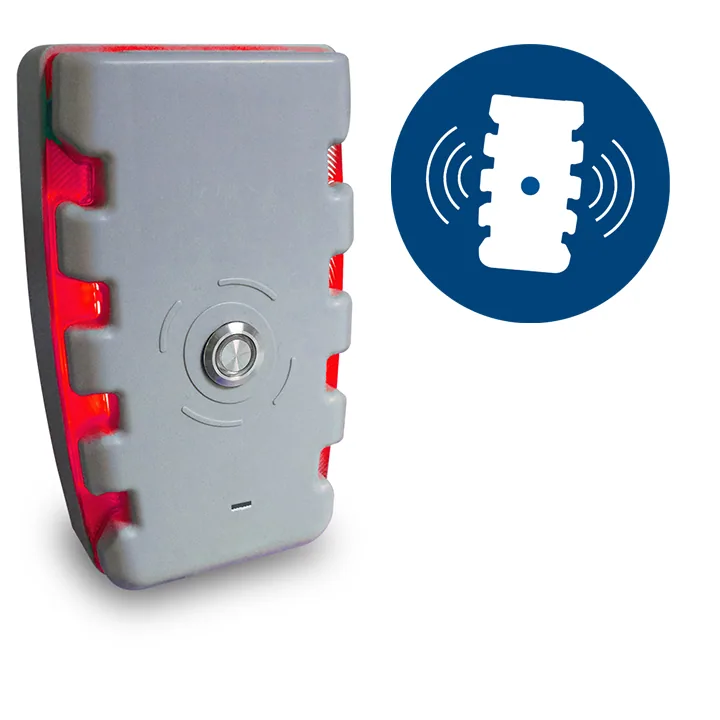
The in-cab control unit gives an audible and visual alarm while the VibraTag vibrates, which the wearer can feel where noise drowns out alarms. The maker expects drivers to slow down or stop and tagged pedestrians to move out of the zone.
 05
05The event is logged and reported
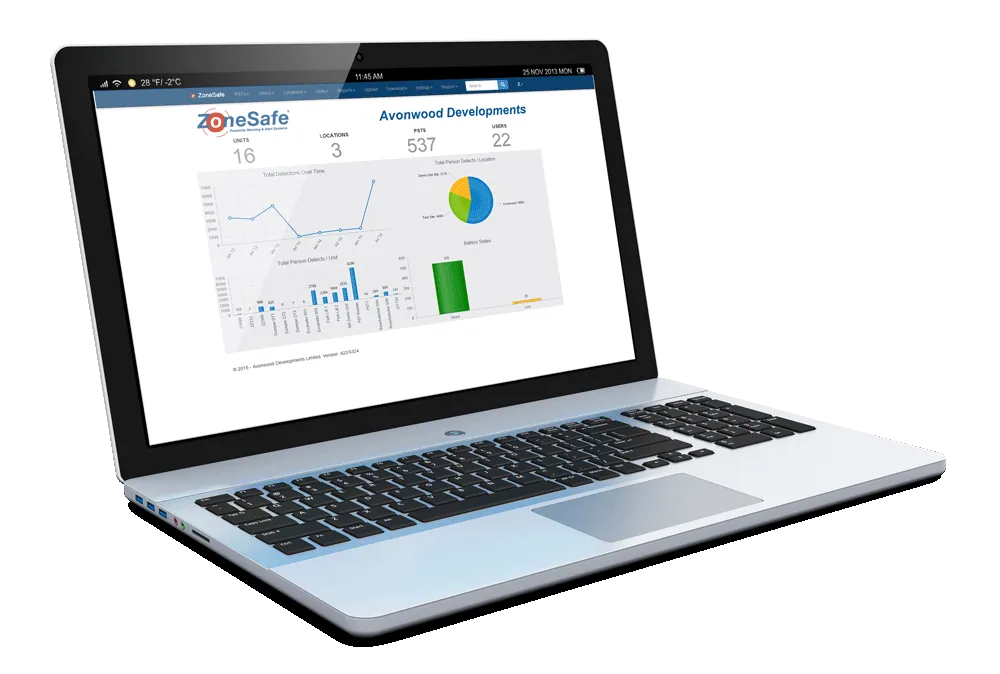
Detections and vehicle activity are stored in the control unit and uploaded to My ZoneSafe, the maker's subscription cloud platform. Managers can review events, find high-risk areas and trends, and schedule daily, weekly or monthly reports.
02 · V2P vs V2V/V2I
Where V2P sits in the ZoneSafe range
The maker sells three main modules that can run alone or together. V2P is the only one of the three that depends on tags worn by people.
V2P, vehicle-to-pedestrian
- Detects
- People wearing VibraTags
- Technology
- Active RFID; no line of sight needed
- Range (maker's figures)
- Up to 10 m, adjustable
- Tags worn by people
- Yes
V2V, vehicle-to-vehicle
- Detects
- Other vehicles fitted with the system
- Technology
- UWB; typically relies on line of sight
- Range (maker's figures)
- Pre-warning up to 50 m; inner zone 5–15 m
- Tags worn by people
- No
V2I, vehicle-to-infrastructure
- Detects
- Approaching equipped vehicles, to trigger signs, lights, projectors or barriers
- Technology
- UWB sensors on the vehicle and at the fixed point
- Range (maker's figures)
- Up to 50 m
- Tags worn by people
- No
From the maker's product overview, FAQ and A–Z glossary (archived copies of 2026-01-16 and 2026-03-09).

03 · Tag routine
Keeping every tag charged, tested and worn
The maker stresses that the system is only as reliable as the tags people wear.
Because V2P only sees people wearing a working tag, the maker sells tag-management equipment and recommends a fixed routine from site entry to the end of the shift. My ZoneSafe can also record who holds which tag, stock levels and battery health.
- Test each tag before every shift with the Plus Tag Tester at the site entrance or weighbridge: green means ready, red means flat or faulty.
- Wear the tag at all times on site: armband, lanyard, belt clip, hard-hat clip or pocket.
- Return tags to the tag board or charger after each shift; a missing tag shows up as an empty hook.
- The 5-bay charger fully charges a tag in under 2 hours, good for up to 3 months on standby (maker's figures).
04 · Specs
ZoneSafe V2P specifications
From the maker's pages and brochure unless marked. The last group is a reseller's 2024 data for the matching hardware and may not match current units.
Detection and alerts
- Detection zone
- 360° around the vehicle
- Range
- Adjustable up to 10 m, typically 3–10 m (maker's figure); a 2026 case study cites 3–11 m
- Antennas
- One or more per vehicle, as one large zone or separate zones
- Technology
- Active UHF RFID; works without line of sight
- Detects through
- Racking, walls, stacked goods, buildings, doors and blind corners
- Driver alert
- Audible and visual alarm from the in-cab control unit
- Pedestrian alert
- VibraTag vibration
- Set-up
- Zones and warning settings calibrated by the maker's team at installation; range and alarm volume can be changed from a smartphone browser
Tags and accessories
- Pedestrian tag
- VibraTag: active RFID, vibrates when detected
- Driver tag
- Activates the system when placed in the in-cab holder
- Protection
- IP67, dust-tight and water-resistant
- Charging
- Under 2 hours in the 5-bay charger or a single wireless charger
- Use per charge
- Up to 3 months on standby
- Service life
- Up to 9 years with continuous use (a 2022 article says up to 10)
- Checking and storage
- Plus Tag Tester (green or red light); tag boards, with optional trays
- Masking
- A Qu-Box masks detection where people must work beside vehicles, such as hand-sorting areas
- Hazardous areas
- Separate ATEX-approved tag for Zone 2 and Zone 22 (announced 2021)
Vehicles, sites and data
- Vehicles
- Electric, LPG and diesel forklifts, HGVs, telehandlers, excavators, load shovels, reach stackers and other heavy plant
- Environment
- Built for robust outdoor use
- System life
- Up to 10 years (main system)
- Event data
- Detections and vehicle activity stored in the control unit and uploaded to the cloud; data including GPS location can be downloaded
- My ZoneSafe
- Cloud dashboard, tag and device management, custom and scheduled reports; subscription
Reseller data (Brigade Electronics, 2024)
- Control unit ZS-1000-ECU
- 12–24 V DC, 0.5 A; IP65; 102 × 180 × 58 mm; up to 6 antennas; stores up to 4,000 events; −40 to +85 °C
- Antenna ZS-1000-AP
- IP67; 122 × 250 × 90 mm; zone programmable 3–10 m; 1 A
- VibraTag ZS-1000-PVT / DVT
- 84 × 53 × 12 mm; −10 to +55 °C; grey for pedestrians, yellow for drivers
- Radio
- Vehicle unit transmits at 125 kHz and receives at 868.3 MHz; tags the reverse
- Control unit functions
- Two-stage alarms, mute button, alarm if the driver tag is left in the vehicle, 3 selectable detection levels
05 · Videos
The maker's animations of V2P at work
All four are animations from ZoneSafe's Vimeo channel; three of them are embedded on the maker's own pages.
ZoneSafe Pedestrian Detection
ZoneSafe · 0:41 · English
Plays from Vimeo once started. Open on Vimeo
ZoneSafe Vehicle To Person Alert Video
ZoneSafe · 0:47 · English
Plays from Vimeo once started. Open on Vimeo
ZoneSafe Proximity Warning Solutions
ZoneSafe · 2:52 · English
Plays from Vimeo once started. Open on Vimeo
ZoneSafe Modular and Configurable Solutions
ZoneSafe · 1:06 · English
Plays from Vimeo once started. Open on Vimeo
06 · Cautions
The maker's conditions for relying on V2P
Quoted from the maker's tag-management, product-overview, warehousing and home pages and from its standard terms of sale.
Our summary, then the maker's own words
Only people wearing a charged, correctly assigned tag are protected; an uncharged, missing or wrongly assigned tag leaves a gap in coverage.
In the maker's words:
If a tag is uncharged, missing, or misassigned, your site’s safety coverage is compromised at critical junctures.
zonesafe.com · Web archiveWear the tag at all times on site; without it, a person is not detectable to moving vehicles.
In the maker's words:
Wear tags to remain detectable to moving vehicles at all times.
zonesafe.com · Web archiveTest every tag daily before the shift, for example with the Plus Tag Tester at the site entrance or weighbridge.
In the maker's words:
Tags should be tested daily.
zonesafe.com · Web archiveA red light on the tester means the tag is flat or faulty; take it out of use immediately.
In the maker's words:
A Red LED indicates the tag is flat or faulty and must be taken out of service immediately.
zonesafe.com · Web archiveAn alert calls for action from both sides: drivers should slow down or stop, and tagged pedestrians should move out of the zone.
In the maker's words:
Pedestrians with tags should move out of the zone when alerted.
zonesafe.com · Web archiveThe maker presents ZoneSafe as an additional layer of protection for places where people and vehicles cannot always be physically separated.
In the maker's words:
Where physical segregation isn’t always possible, ZoneSafe provides an additional layer of protection between vehicles and pedestrians.
zonesafe.com · Web archiveIn areas masked with a Qu-Box, such as hand-sorting lines where people work beside vehicles, the system is deliberately set not to alarm.
In the maker's words:
Using a ZoneSafe Qu-box will mask the system enabling vehicles to operate without triggering an alarm.
zonesafe.com · Web archiveThe maker's terms treat published specifications and performance figures as approximate and open to change without notice.
In the maker's words:
are approximate or estimates only and may be varied by the Company at any time without notice
avonwood.co.uk
07 · FAQ
Questions the maker answers
Who installs and sets up the system?
The maker's team. It assesses the site and decides where each component goes, fits the vehicle units, tags and any fixed equipment, calibrates the zones and warning settings, and trains operators and staff.
From the maker's siteHow long does the equipment last?
The maker quotes up to 10 years for the main system and up to 9 years for each VibraTag, subject to continuous use.
From the maker's siteWhat does it cost?
There is no fixed price. Quotes depend on the number of vehicle units and tags and on any infrastructure such as beacons or barriers, and a site can start with its highest-risk areas and add more in phases.
From the maker's siteIs My ZoneSafe a one-off purchase?
No, it is a subscription covering the cloud platform, automatic data uploads and analysis features. Prices come from the sales team.
From the maker's siteDo drivers need a different tag?
Yes. Pedestrian tags vibrate to warn the wearer, while driver tags are set up to activate the system when placed in the cab holder.
From the maker's siteWhere and how quickly does the maker supply?
Avonwood supplies directly in the UK and sometimes abroad, and otherwise through international resellers. A purchase can sometimes be completed in a couple of weeks, but delivery follows its production schedule and an agreed project date.
From the maker's site08 · Sheet
Side by side, on the same sheet.
Every product in the catalog is described with the same fields, in the same order, so you can compare them side by side. What it reduces and where it fits are at the top of this page.
- Key specs
- A vehicle antenna creates a 360° detection zone, adjustable up to 10 m (typically 3–10 m); several antennas can form one large zone or separate zones. When a worker wearing an active RFID VibraTag enters, the in-cab control unit alarms by sound and light and the tag vibrates. Detection needs no line of sight (through racking, walls, stacked goods). VibraTags: IP67, charge in under 2 hours, up to 3 months on standby per charge. Detections are logged and uploaded to the My ZoneSafe cloud service (subscription).
- Price conditions
- Not in public info
- Trial
- Not in public info
- Lead time
- Not published for Japan. The maker's FAQ says a purchase can sometimes be completed in a couple of weeks, with delivery subject to its production schedule and an agreed project date (archived copy, 2026-03-09).
- Service and repair
- 12-month return-to-base guarantee on goods Avonwood manufactures (defects notified in writing within 12 months of supply; return at the customer's cost; void after any modification, repair or misuse by the customer or a third party), plus a free 90-day entry-level service contract when Avonwood installs the system (maker's standard terms). The maker gives a service life of up to 10 years for the main system and up to 9 years for VibraTags.
- Local partner
- Not in public info
- StandardsMaker's declaration
- The maker states its products are made to CE, FCC and RED requirements (no standard numbers or declarations of conformity are published). Avonwood's quality management system is certified to ISO 9001:2015 by CSA Group (certificate 980123, first certified 1998; scope: design, development, manufacture, service and repair of RFID systems). VibraTags are rated IP67. A separate ATEX-approved tag for Zone 2 and Zone 22 areas was announced in 2021.
09 · Documents
Documents and links.
Official files and pages from Avonwood Developments. Each opens on the maker's site.
- Vehicle to Person Alert brochure (2023, linked from the V2P page)Brochure · English · PDF
- ZoneSafe V2P product page (forklift pedestrian proximity system)Web page · English · zonesafe.com
- ZoneSafe frequently asked questionsWeb page · English · zonesafe.com
- Tag management: tags, boards, chargers and testerWeb page · English · zonesafe.com
- My ZoneSafe data managementWeb page · English · zonesafe.com
- ZoneSafe A–Z product glossaryWeb page · English · zonesafe.com
- Avonwood ISO 9001:2015 certificate (CSA Group, No. 980123)Certificate · English · PDF
- Avonwood terms and conditions (guarantee and installation terms)Web page · English · avonwood.co.uk
10 · Maker
Avonwood Developments
United Kingdom
Avonwood Developments is a UK company that designs, makes, services and repairs RFID systems for safety, security and asset management. Incorporated in 1991, it bought the Eureka RFID brand in 1994, now used for key-control systems in UK prisons, and has developed the ZoneSafe proximity warning range since the early 2000s.
- Founded
- 1991
- Headquarters
- Wimborne, Dorset, United Kingdom
- Website
- avonwood.co.uk
Sources44
Read on . Each date below is the version we read: an archived copy's capture date, or a document's own date.
- ZoneSafe: Forklift pedestrian proximity system (V2P product page; Internet Archive copy, live site blocks automated readers)zonesafe.com · Web archive ·
- ZoneSafe: same V2P product page, earlier archive copy (2020 antenna image)zonesafe.com · Web archive ·
- ZoneSafe: Vehicle to Person Alert brochure (PDF, created 2023-09; archive copy)zonesafe.com · Web archive ·
- ZoneSafe: Frequently asked questions (archive copy)zonesafe.com · Web archive ·
- ZoneSafe: Proximity warning systems overview and FAQ (archive copy)zonesafe.com · Web archive ·
- ZoneSafe: Home page (archive copy)zonesafe.com · Web archive ·
- ZoneSafe: About us (archive copy)zonesafe.com · Web archive ·
- ZoneSafe: Tag management (archive copy)zonesafe.com · Web archive ·
- ZoneSafe: My ZoneSafe data management (archive copy)zonesafe.com · Web archive ·
- ZoneSafe: A–Z product glossary (archive copy)zonesafe.com · Web archive ·
- ZoneSafe: Distributors and resellers (archive copy)zonesafe.com · Web archive ·
- ZoneSafe: Proximity warning systems for warehousing and logistics (archive copy)zonesafe.com · Web archive ·
- ZoneSafe: Contact us (archive copy)zonesafe.com · Web archive ·
- ZoneSafe: Terms and conditions (points to the company site; archive copy)zonesafe.com · Web archive ·
- ZoneSafe: Proximity warning system cost guide (archive copy)zonesafe.com · Web archive ·
- ZoneSafe: How do tag-based proximity warning systems compare with other devices? (article, modified 2025-11-06; archive copy)zonesafe.com · Web archive ·
- ZoneSafe: How does the ZoneSafe proximity warning system work? (article, modified 2025-12-08; archive copy)zonesafe.com · Web archive ·
- ZoneSafe: Vibrating proximity tags (article, modified 2025-07-22; archive copy)zonesafe.com · Web archive ·
- ZoneSafe: New product: ATEX approved tags (article, 2021-07-23; archive copy)zonesafe.com · Web archive ·
- ZoneSafe: 25 years of ISO 9001 (article, 2025-10-22; archive copy)zonesafe.com · Web archive ·
- ZoneSafe: Congratulations Marpress on Anatel certification (article, 2022-01-06; archive copy)zonesafe.com · Web archive ·
- ZoneSafe: Case study, J. Dickinson & Sons (archive copy)zonesafe.com · Web archive ·
- ZoneSafe: Vehicle to Person Alert for materials handling equipment (PDF, 2018; archive copy)zonesafe.com · Web archive ·
- ZoneSafe: Creating safer places to work, product brochure (PDF, 2019; archive copy)zonesafe.com · Web archive ·
- ZoneSafe: Insight data management sheet (PDF, 2020; archive copy)zonesafe.com · Web archive ·
- Avonwood Developments: Home pageavonwood.co.uk ·
- Avonwood Developments: About usavonwood.co.uk ·
- Avonwood Developments: Proximity warning systemsavonwood.co.uk ·
- Avonwood Developments: Terms and conditionsavonwood.co.uk ·
- Avonwood Developments: WEEE policy / ISO 9001avonwood.co.uk ·
- Avonwood Developments: ISO 9001:2015 certificate, CSA Group No. 980123 (PDF, issued 2024-03-26)avonwood.co.uk ·
- Avonwood Developments: media library (image files and sizes)avonwood.co.uk ·
- Vimeo: ZoneSafe Pedestrian Detectionvimeo.com ·
- Vimeo: ZoneSafe Vehicle To Person Alert Videovimeo.com ·
- Vimeo: ZoneSafe Proximity Warning Solutionsvimeo.com ·
- Vimeo: ZoneSafe Modular and Configurable Solutionsvimeo.com ·
- YouTube (ZoneSafe channel): How to configure ZoneSafe proximity warning systems? (description used for smartphone-browser set-up)youtube.com ·
- Brigade Electronics (reseller): ZoneSafe RFID detection system page (archive copy; used only for the labelled reseller data)brigade-electronics.com · Web archive ·
- Brigade Electronics: Japanese-language home page (archive copy; no ZoneSafe product in the menu)brigade-electronics.com · Web archive ·
- Brigade Electronics: Japanese-language home page (earlier archive copy; menu linked ZoneSafe to the English product page)brigade-electronics.com · Web archive ·
- Brigade Electronics: live Japanese-site navigation, read from a not-found page because the site blocks automated readers (no ZoneSafe product; the global /zz-not-found-check.txt and US /en-us/zz-not-found-check.txt pages show the same)brigade-electronics.com ·
- Made in Britain: ZoneSafe V2P proximity warning system listing (Avonwood member listing; corroboration)madeinbritain.org ·
- Rakuten Ichiba search for 'zonesafe' (no ZoneSafe items found)search.rakuten.co.jp ·
- Amazon.co.jp search for 'ZoneSafe' (no-match message; automated search there is unreliable)amazon.co.jp ·
We wrote this page from Avonwood Developments's public website and documents as of . Avonwood Developments has not confirmed anything on it and is not involved with this site. Photos and videos are Avonwood Developments's own, each linked to where it appears. Items the maker does not publish are marked “Not in public info”. Standards are the maker's declarations; we do not judge compliance.
Other products on the same sheet

BodyGuard i-Tag
BodyGuard Safety Solutions · Australia
Tag-based proximity warning: the driver hears a spoken alert and the pedestrian's tag vibrates.

TWIG One
Twig Com · Finland
A belt-worn lone worker alarm with an SOS key, optional automatic man-down alerts and loud hands-free calls.

WorkForce WF2
Grace Industries · United States
Clip-on man-down pendant with a colour screen that sends fall, no-motion and panic alarms over site radio.